Phones #
This section of settings provides the tools to manage the configuration/keymaps of supported devices.
Phones can be added to the system individually or imported in bulk before they are then assigned to customers and users.
Keep reading this page for information on provisioning and supported hardware. Otherwise, follow the links below for information on how to add/edit phones or specific information on configuration and keymap options:
- Devices -> Adding/Editing devices
- Configuration -> Details on available configuration options
- Keymap -> Details on available softkey types
warning
When provisioning a phone which has been used on a previous system, ensure it has been completely removed from that system before adding it to ~.Dimensions.~. If it is not correctly removed, ~.Dimensions.~ will not be able to successfully provision the phone on the manufacturer's provisioning server.
Provisioning #
Every device that is managed by ~.Dimensions.~ will be provided with configuration files and firmware. When a device makes a provisioning request, it is passed a combination of the default 'Configuration Options' and any configuration overridden at the individual device's level.

Each device will receive provisioning updates in the following ways:
- Phone Reboot - The phone is manually rebooted
- Daily Re-sync - By default, all devices are configured to re-provision on a daily basis
- Configuration Update - Devices are dynamically pushed configuration updates when there has been a change through the customer (or reseller) portal
Custom Configuration Files #
In addition to the configuration items that can be set through the ~.Dimensions.~ user interface, the ability to provide other device configurations through custom config files is provided.
| Manufacturer | Custom Config Support | |
|---|---|---|
| Yealink | ✔ | docs |
| Poly | ✔ | docs |
| Mitel (68/69xx) | ✔ | docs |
| Mitel (53xx) | ✘ | |
| Cisco | ✔ | docs |
| Avaya | ✔ | docs |
| Grandstream | ✔ | docs |
tip
Use the device specific links above for details on how to use the custom configuration files.
Custom configuration files can be created under a customer' account. Once created, there are two ways a custom configuration file can be applied to a phone:
Device Specific Mapping
The file can be assigned on a device by device basis. To assign a file to a device, edit the config on the device and select the 'Settings' tab. The custom configuration file option should be visible in the 'Advanced' section.
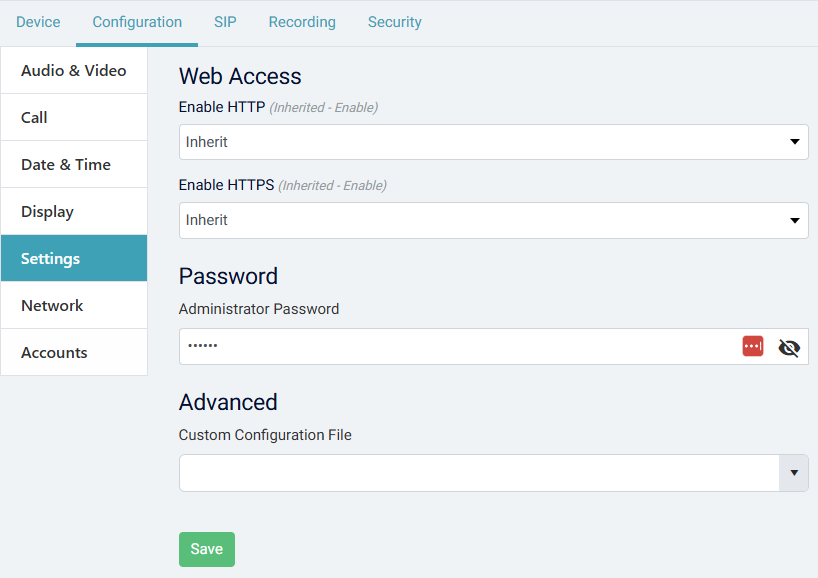
Select the file to apply to the phone from the drop-down list and press 'Save'.
tip
The drop-down list will only show files that match the current device's manufacturer type.
info
Adding a device specific file will stop the manufacturer default being applied to the phone. Only one additional file can be assigned at a time.
Manufacturer Default
An alternative way to apply configuration files is to use the 'Set as default for this manufacturer' option on the file settings.
When this is set, any phone with a matching manufacturer type and that does not have a device specific file assigned, will use this file.
warning
Ensure you understand he implications and test your configurations in QA environment before applying them to live systems. Any configuration entered here can override system generated configuration which could result in stopping the phones from operating.
Supported Phones #
Avaya #
~.Dimensions.~ supports Avaya phones and automatic provisioning via the Device Enrollment Service (DES). Once added to the ~.Dimensions.~ portal, a configured Avaya phone will download the required configuration, keymaps and firmware.
Supported phones:
The following table lists all Avaya phones which are supported for automatic provisioning.
| Series | Models | Directory Support | Comments |
|---|---|---|---|
| J Series | J129, J139, J159, J169, J179, J189 | 1 Directories 250 contacts per directory |
Cisco #
~.Dimensions.~ supports Cisco phones and automatic provisioning via the Cloud Device Activation (CDA). Once added to the ~.Dimensions.~ portal, a configured Cisco phone will download the required configuration, keymaps and firmware.
info
Only the 8800/7800 series of Cisco phones are supported for automatic provisioning.
Supported phones:
The following table lists all Cisco phones which are supported for automatic provisioning.
| Series | Models | Directory Support | Comments |
|---|---|---|---|
| SPA1 | SPA301, SPA303 SPA501G, SPA502G, SPA504G, SPA508G, SPA509G SPA512G, SPA514G, SPA525G, SPA525G2 |
Supported | Automatic provisioning not supported |
| 68xx | 6821, 6841, 6851,6861, 6871 | Supported | Automatic provisioning not supported |
| 78xx | 7811, 7821, 7841, 7861 | Supported | |
| 88xx | 8811, 8841, 8845, 8851, 8861, 8865 | Supported | |
| ATA | ATA191, ATA192 | N/A |
-
These phones do not support TLS 1.2. ↩︎
Generic SIP Phones #
Any SIP phone which is not listed above can still be provisioned on ~.Dimensions.~, but it will need to be manually provisioned. This means manually configuring:
- SIP Credentials
- General Phone Config
- Keymaps for feature codes
Please refer to the Generic SIP Phones section for more information.
Grandstream #
~.Dimensions.~ supports Grandstream ATAs and automatic provisioning via the GDMS. Once added to the ~.Dimensions.~ portal, a configured Grandstream phone will download the required configuration and firmware.
Supported phones:
The following table lists all Grandstream phones which are supported for automatic provisioning.
| Series | Models | Directory Support | Comments |
|---|---|---|---|
| GS Series | HT801, HT802, HT812, HT814, HT818 | Not Supported | |
| GXW Series | GXW4216, GXW4224, GXW4232, GXW4248, GXW4216, GXW4224, GXW4232, GXW4248 | Not Supported |
Mitel #
~.Dimensions.~ supports Mitel phones and automatic provisioning via the Mitel RCS. Once added to the ~.Dimensions.~ portal, a configured Mitel phone will download the required configuration, keymaps and firmware.
Supported phones:
The following table lists all Mitel phones which are supported for automatic provisioning.
| Series | Models | Directory Support | Comments |
|---|---|---|---|
| 68xx | 6863i, 6865i, 6867i 6869i, 6873i |
2* Directories 2,000 contacts per directory |
|
| 69xx | 6905, 6910, 6915, 6920/6920w, 6930/6930w, 6940/6940w 6970 |
2* Directories 2,000 contacts per directory |
|
| 53xx | 5312, 5320, 5324 53301, 53401, 5360 5320e, 5330e, 5340e |
1* Directory 50 contacts |
Phones need to be placed in SIP mode first. |
info
- One of the directories on each phone is used for internal user contact records.
-
This phone does not support TLS 1.2. ↩︎
Poly #
~.Dimensions.~ supports Poly phones and automatic provisioning. Once added to the ~.Dimensions.~ portal, a configured Poly phone will download the required configuration, keymaps and firmware.
Supported phones:
The following table lists all Poly phones which are supported for automatic provisioning.
| Series | Models | Directory Support | Comments |
|---|---|---|---|
| VVX | VVX_101, VVX_150 VVX_201, VVX_250 VVX_300, VVX_301, VVX_310, VVX_311, VVX_350 VVX_400, VVX_401, VVX_410, VVX_411, VVX_450 VVX_500, VVX_501 VVX_600, VVX_601 VVX_1500 |
2* Directories 500 contacts per directory |
|
| SoundPoint | IP321 (Beta), IP330 (Beta), IP331 (Beta), IP335 (Beta) IP450 (Beta) IP550 (Beta), IP560 (Beta) IP650 (Beta), IP670 (Beta) |
2* Directories 500 contacts per directory |
|
| SoundStation | IP5000 (Beta), IP6000 (Beta), IP7000 (Beta) | 2* Directories 500 contacts per directory |
|
| Edge | E100 E220 E300, E320, E350 E400, E450 E500, E550 |
2* Directories 500 contacts per directory |
|
| Trio | 8500, 8800 | 2* Directories 500 contacts per directory |
info
- One of the directories on each phone is used for internal user contact records.
warning
Any phone labeled Beta is being verified for a future release and is not yet supported.
Yealink #
~.Dimensions.~ supports Yealink phones and automatic provisioning via the Yealink RPS. Once added to the ~.Dimensions.~ portal, a defaulted Yealink phone will automatically find the ~.Dimensions.~ service and will download the required configuration, keymaps and firmware.
Supported phones:
The following table lists all Yealink phones which are supported for automatic provisioning.
| Series | Models | Directory Support | Comments |
|---|---|---|---|
| T1x | T19P12, T19P E21 | 1* Directories 1,000 contacts per directory |
|
| T2x | T21P1, T21P_E21 T23P1, T23G1 T26P1 T27G1, T27P1 T28P1 T29G1 |
3* Directories 1,000 contacts per directory |
|
| T3x | T30, T30P T31, T31P, T31G T32G1 T33P, T33G T34W |
5* Directories 1,000 contacts per directory |
|
| T4x | T40G1, T40P1 T41U, T41G1, T41S, T41P1 T42U, T42G1, T42S T43U T44U, T44W T46U, T46G1, T46S T48U, T48G1, T48S T49G |
5* Directories 1,000 contacts per directory |
|
| T5x | T53, T53W T54W, T57W, T58, T58W |
5* Directories 1,000 contacts per directory |
|
| T7x | T73U, T73W T77U |
5* Directories 1,000 contacts per directory |
|
| T8x | T85W, T87W T88V |
5* Directories 1,000 contacts per directory |
|
| VPx | VP59 | 5* Directories 1,000 contacts per directory |
|
| Wx | W52P, W56P, W60B, W70B, W80B, W90B | 5* Directories 1,000 contacts per directory |
|
| CP | CP920, CP930W, CP960 CP925, CP935W, CP965 |
5* Directories 1,000 contacts per directory> |
|
| AX | AX83H, AX86R | 1* Directories 1,000 contacts per directory> |
info
- One of the directories on each phone is used for internal user contact records.
warning
Any phone labeled Beta is being verified for a future release and is not yet supported.